Integrating the Christmas Bear with Gift 3D SVG into Your Holiday Design Workflow
The holiday season often brings a surge of creative projects, from personalized gifts to home decor and small business product lines. For designers, crafters, and entrepreneurs, managing this influx requires more than just inspiration; it demands efficient tools that integrate seamlessly into existing workflows. The Christmas Bear with Gift 3D SVG represents one such asset—a versatile digital file designed to streamline the creation of layered, dimensional decorations. By understanding how this specific design fits into broader production processes, you can reduce friction in your projects and achieve consistent, high-quality results.
Understanding the Asset and Its Role in Production
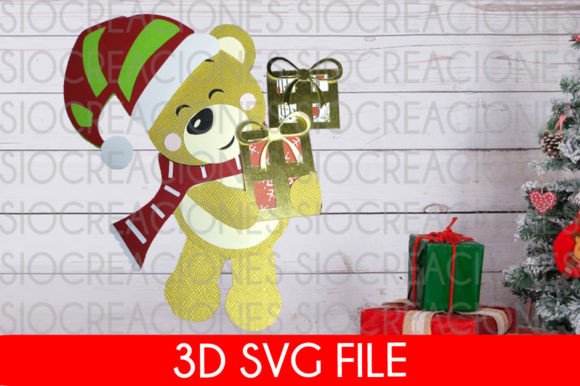
A 3D SVG is not merely a flat image; it is a vector-based instruction set that allows cutting machines to create depth through layering. The Layered Christmas Bear with Gifts 3D SVG includes multiple components that, when stacked, create a shadow-box effect or a standing decoration. This distinction is crucial for planning. Unlike simple single-layer decals, a 3D design requires careful consideration of material thickness, adhesive choices, and assembly order.
In a professional or serious hobbyist context, this asset serves as a foundational element. It can be the centerpiece of a greeting card, a decorative topper for baked goods, or a standalone ornament. Recognizing its structural nature helps you allocate the right amount of time for both digital preparation and physical assembly. The design has been rigorously tested in industry-standard platforms like Cricut Design Space and Silhouette Studio, ensuring that the paths are clean and the layers align correctly. This compatibility reduces the troubleshooting phase, allowing you to move quickly from download to production.
Pre-Production: File Management and Compatibility Checks
Effective workflow begins before you even open your design software. When you purchase the Christmas Bear with Gift 3D SVG, you will receive a compressed file in .zip format. This is a standard delivery method for digital assets, but it requires an extra step that can sometimes cause confusion for beginners. You must uncompress or unzip the folder to access the individual SVG files inside. Failing to do so may result in errors when attempting to upload the design directly from the zipped archive.
Once extracted, organize your files immediately. Create a dedicated folder for holiday assets, and within that, subfolders for specific projects. This organizational habit pays dividends when you are juggling multiple client orders or personal projects. Since the file is in SVG format, it is scalable without loss of quality. This means you can adjust the size of the bear to fit a small cupcake topper or a large door hanger without worrying about pixelation. However, always verify the scale in your software before sending the job to your cutter to ensure the layers remain proportional.
Integration with Cutting Machines and Software
The true value of a well-designed SVG lies in its interoperability. Whether you use a Cricut or a Silhouette machine, the Layered Christmas Bear with Gifts 3D SVG is engineered to behave predictably. In Cricut Design Space, the layers should appear grouped logically, allowing you to attach or weld them if necessary for specific material types. In Silhouette Studio, the cut lines should be clear and distinct from score lines if any are included.
For optimal results, consider the following implementation tips:
- Material Selection: Choose cardstock or vinyl based on the intended use. Heavier cardstock provides better structural integrity for standing decorations, while vinyl is ideal for smooth surfaces like glass or metal.
- Layer Alignment: Use registration marks if your machine supports them, or carefully align layers manually using the grid in your software. Precision here prevents the "shadow" effect from looking misaligned.
- Test Cuts: Before committing to expensive materials, perform a test cut on scrap paper. This verifies that the blade depth and pressure settings are correct for the intricate details of the bear’s features.
These steps ensure that the digital file translates accurately into a physical object, minimizing waste and rework. Consistency in these preparatory actions builds a reliable production rhythm, which is essential during the busy holiday season.
Application Across Different Creative Contexts
The versatility of the Christmas Bear with Gift 3D SVG allows it to fit into various creative and commercial scenarios. Understanding where it fits in your broader project timeline can enhance its utility.
Home Decor and Personalization
For homeowners and DIY enthusiasts, this design offers a quick way to add festive charm to any space. You can decorate your cake, door, tree, or any other area in your home. The process involves cutting the layers, assembling them with foam tape for depth, and attaching them to a base. This can be done in batches, making it an efficient weekend project. The cute aesthetic of the bear appeals to a wide audience, making it suitable for family-friendly environments.
Small Business Product Lines
Entrepreneurs and small business owners can leverage this asset to expand their holiday offerings. Because the design is tested and reliable, it reduces the risk of production errors that could delay orders. You can incorporate the bear into gift tags, packaging inserts, or standalone ornaments. The key is to maintain consistency in quality. By standardizing the assembly process—using the same adhesives, materials, and alignment techniques—you ensure that every item meets customer expectations. This reliability builds brand trust and encourages repeat business.
Educational and Community Projects
Educators and community leaders can use the Layered Christmas Bear with Gifts 3D SVG for group activities. The layering process teaches spatial reasoning and fine motor skills. By preparing the kits in advance—cutting the layers and providing clear assembly instructions—you can facilitate a smooth and engaging workshop. The simplicity of the design ensures that participants of varying skill levels can achieve satisfying results.
Quality Control and Long-Term Usability
Integrating a digital asset into your workflow is not a one-time event. The Christmas Bear with Gift 3D SVG is a resource you can return to year after year. To maximize its long-term value, document your settings and processes. Note which blade type worked best, what pressure settings were used, and any adjustments made for different materials. This documentation creates a knowledge base that speeds up future projects.
Additionally, consider how the design interacts with other elements. Can it be combined with text SVGs for personalized messages? Can it be paired with other seasonal icons to create a cohesive collection? Thinking about these connections allows you to build a more robust library of assets. The ease of use reported by users in both Cricut Design Space and Silhouette Studio suggests that the design is robust enough to handle such modifications without breaking.
Final Thoughts on Efficient Implementation
The Christmas Bear with Gift 3D SVG is more than just a cute holiday image; it is a tool for efficient creative production. By treating it as part of a structured workflow—from file management and compatibility checks to precise cutting and thoughtful application—you can enhance both the quality and speed of your projects. Whether you are decorating your home, fulfilling customer orders, or leading a community workshop, this asset supports your goals through its reliability and versatility.
Remember to unzip the file upon receipt, organize your digital assets, and test your machine settings. These small, practical steps ensure that the transition from digital file to physical decoration is smooth and enjoyable. As you integrate this design into your routine, you will find that having tested, high-quality assets like this one reduces stress and allows you to focus on the creative aspects of your work. Enjoy the process, and let the charming design of the bear bring warmth to your holiday creations.