Kitchen Wall Frame Mockup Guide
Presenting digital artwork in a way that feels tangible and authentic is one of the most persistent challenges for graphic designers, interior decorators, and e-commerce sellers. A flat JPEG on a white background rarely conveys the emotional weight or aesthetic potential of a piece. This is where a high-quality Kitchen Wall Frame Mockup becomes an indispensable tool. By placing your design within a photorealistic environment, you bridge the gap between concept and reality, allowing clients and customers to visualize exactly how a poster will look in their own space.
The value of these tools extends far beyond simple aesthetics. They serve as critical communication assets that reduce ambiguity, accelerate approval processes, and enhance perceived value. Whether you are selling printable art, designing custom home decor, or pitching a branding campaign, the context in which you display your work matters immensely. A well-crafted mockup does the heavy lifting of lighting, perspective, and texture, freeing you to focus on the creative core of your project.
Why Context Drives Conversion and Approval
Human beings are visual creatures who rely on environmental cues to judge scale, quality, and suitability. When a client sees a design in isolation, they must mentally project it into a room—a cognitive task that often leads to hesitation or misinterpretation. A Kitchen Wall Frame Mockup eliminates this mental burden. By showcasing your artwork in a meticulously rendered 3D scene, you provide immediate context.
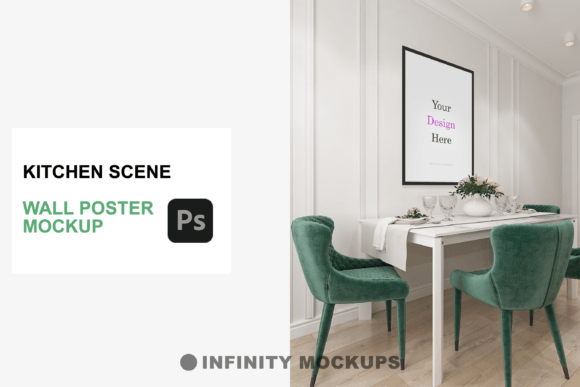
Consider the specific dynamics of a kitchen setting. Kitchens are high-traffic areas with distinct lighting conditions, often featuring reflective surfaces like tiles, stainless steel, or glass. A generic mockup might fail to capture these nuances, but a specialized kitchen scene accounts for them. The interplay of natural light from a window and artificial under-cabinet lighting creates shadows and highlights that ground the image in reality. This level of detail signals professionalism and attention to detail, traits that build trust with potential buyers or corporate clients.
For e-commerce entrepreneurs, this realism directly impacts conversion rates. Customers are more likely to purchase a print when they can see how it complements modern cabinetry or contrasts with neutral wall colors. It transforms a commodity into a lifestyle aspiration. Instead of selling a piece of paper, you are selling the feeling of a completed, stylish home.
Versatility Through Frame and Shape Options
One size rarely fits all in design presentation. Different artworks demand different framing to achieve visual harmony. A robust mockup package offers versatility, allowing you to tailor the presentation to the specific tone of your piece. The inclusion of multiple frame styles—such as sleek black, minimalist white, warm wooden, and customizable color options—ensures that your design never feels forced into an incompatible container.
Furthermore, the aspect ratio of your artwork dictates the frame shape. A square 1:1 composition requires a different visual balance than a wide horizontal landscape or a tall vertical portrait. High-quality templates automatically adjust to these dimensions, maintaining correct proportions and perspective. This automation saves significant time, eliminating the need to manually warp or distort images to fit pre-set boundaries. For designers handling large volumes of client work, this efficiency is invaluable.
The ability to toggle between these options also supports A/B testing for online stores. You might find that a botanical print sells better with a light wooden frame in a bright kitchen setting, while a modern typographic quote performs better with a stark black frame against a darker backdrop. Having these variations at your fingertips allows for data-driven design decisions rather than guesswork.
Mastering Light and Focus with Fade Effects
Realism is not just about sharpness; it is about atmosphere. Sometimes, the goal is to make the artwork the undeniable hero of the image. Other times, the objective is to show how the art blends seamlessly into a curated interior. The "fade effect" layer found in advanced mockups provides this control. By adjusting the opacity or visibility of this layer, you can dictate the visual prominence of the poster.
In a busy kitchen scene filled with utensils, plants, and textures, a fully opaque poster might compete for attention. Dialing back the intensity slightly can create a more natural, lived-in look, suggesting that the art has been part of the home for years. Conversely, boosting the contrast and saturation ensures that every detail of your illustration or typography pops, which is crucial for intricate designs or small text elements. This feature empowers you to concentrate the viewer’s eye exactly where you want it, enhancing the narrative impact of your presentation.
Streamlining Workflow with Smart Objects
Time is a non-renewable resource for creatives. The technical barrier to creating realistic 3D renders from scratch is high, requiring specialized software and hours of rendering time. Photoshop mockups leverage Smart Objects to democratize this process. With a few clicks, you can drop your design into a designated layer, and the template handles the perspective mapping, shadow casting, and lighting integration automatically.
This seamless integration is particularly beneficial for freelancers and small business owners who wear multiple hats. It allows a graphic designer to produce marketing assets that look like they were created by a professional photography team. The included video tutorial further lowers the learning curve, ensuring that even users with intermediate Photoshop skills can achieve premium results quickly. This educational component is vital, as it teaches not just how to use the file, but best practices for preparing files for optimal output.
However, it is important to recognize the limitations. While mockups are powerful, they are still simulations. They cannot replace actual photography if the client requires proof of physical material quality, such as paper texture or ink vibrancy. Additionally, over-reliance on a single popular mockup can lead to brand fatigue if competitors use the same assets. Therefore, it is wise to use these tools as part of a broader visual strategy, mixing them with original photography or varied scenes to keep your portfolio fresh and authentic.
Who Benefits Most from These Tools?
The utility of a Kitchen Wall Frame Mockup spans various professions. Interior designers use them to present mood boards to clients, helping them visualize color schemes and art placement before making purchases. Print-on-demand sellers rely on them to create compelling product listings without holding inventory. Marketing agencies use them to pitch campaign concepts in situ, showing how outdoor ads or in-store displays will look in real-world environments.
Educators and bloggers also find value in these assets. They can create engaging visuals for tutorials or articles without needing access to a physical studio. The ability to rapidly iterate designs allows for more experimental and creative content, fostering a deeper connection with their audience.
Making the Right Choice for Your Needs
When selecting a mockup, consider the resolution and lighting consistency. Ensure the scene matches the vibe of your target audience. A rustic kitchen scene may not suit ultra-modern minimalist art, just as a sterile, modern space might clash with vintage illustrations. Look for packages that offer high-resolution outputs suitable for both web and print presentations. The inclusion of a video tutorial is a strong indicator of a user-friendly product, suggesting that the creator has thoughtfully considered the user experience.
Ultimately, the goal is to elevate your artistry. By removing the technical friction of presentation, you allow your creative work to speak for itself. A well-chosen mockup does not distract; it enhances. It provides the stage upon which your design can perform, turning passive viewers into engaged customers or approving clients. In a digital-first world, the ability to simulate reality with precision is not just a nice-to-have—it is a competitive necessity.