Office Room Canvas Mockup: Presenting Artwork with Professional Realism
Presenting digital designs in a way that feels tangible and grounded is one of the most persistent challenges for graphic designers, illustrators, and marketing professionals. When you spend hours perfecting a poster, a motivational quote, or a piece of corporate art, displaying it as a flat JPEG on a white background rarely does it justice. Clients and customers struggle to visualize how that design will look in a real environment. This is where an Office Room Canvas Mockup becomes an essential tool in your creative workflow. It bridges the gap between abstract digital files and physical reality, allowing viewers to imagine the artwork hanging on their own walls.
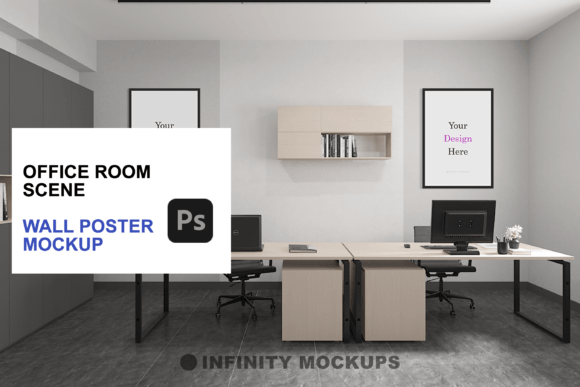
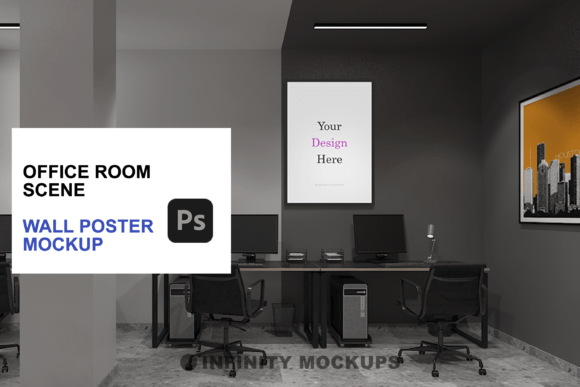
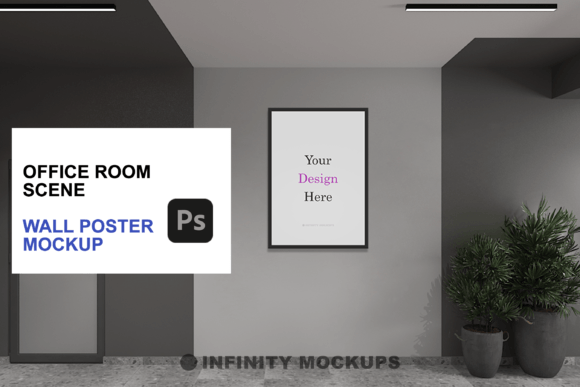
The concept is straightforward but powerful. Instead of showing a isolated image, you place your design into a photorealistic 3D-rendered office scene. The lighting, shadows, and perspective are already calculated, meaning your artwork automatically inherits the environmental cues of the room. This not only saves time but significantly increases the perceived value of your work. Whether you are selling prints on an e-commerce platform, pitching a branding concept to a corporate client, or simply organizing your portfolio, the right presentation context can make the difference between a scroll-past and a conversion.
Why Context Matters in Digital Presentation
Human brains are wired to process visual information within contexts. A poster floating in void space requires the viewer to do the mental heavy lifting of imagining scale, texture, and placement. An office room scene does that work for them. When potential buyers or clients see a design framed and hanging in a modern, well-lit workspace, they immediately understand its scale relative to furniture and its aesthetic compatibility with professional decor.
This psychological ease is crucial for sales and approvals. For freelancers and small business owners, reducing friction in the decision-making process is key. If a client can instantly see how a motivational quote looks above a desk or how a corporate mission statement fits into a conference room vibe, they are more likely to approve the design quickly. The realistic room scene provided by high-quality mockups eliminates ambiguity. It transforms a static design file into a lifestyle product, suggesting not just what the art looks like, but how it feels to live or work with it.
Versatility Across Professional and Creative Use Cases
The utility of an office room canvas mockup extends far beyond simple poster sales. Different users leverage these tools for varied objectives, depending on their industry and goals.
- E-commerce Sellers: For artists selling prints on platforms like Etsy or Shopify, mockups are the primary substitute for physical photography. Shooting every new design in a real studio is cost-prohibitive and time-consuming. Using a PSD mockup allows sellers to upload dozens of new listings in minutes, maintaining a consistent, high-end brand aesthetic without leaving their home office.
- Corporate Branding Specialists: When designing internal communications, office decor, or event signage, designers need to show stakeholders how these elements integrate into existing workspaces. A mockup helps demonstrate how a new company value poster will look in a breakroom or hallway, facilitating faster feedback loops and approval from management.
- Digital Marketers and Bloggers: Content creators often need eye-catching featured images for articles about productivity, office setup, or interior design. Placing relevant graphics into an office scene creates engaging social media assets that stand out in crowded feeds, driving higher click-through rates than standard flat graphics.
- Educators and Trainers: Teachers creating materials for online courses or virtual classrooms can use these scenes to display syllabus highlights, inspirational quotes, or lesson summaries in a way that feels organized and professional, enhancing the learning experience for remote students.
Key Features That Enhance Realism and Flexibility
Not all mockups are created equal. The effectiveness of an Office Room Canvas Mockup depends heavily on the quality of its rendering and the flexibility of its layers. High-end mockups, such as those including video tutorials and multiple frame options, offer distinct advantages that streamline the customization process.
One critical feature is the variety of frame styles. A single design might look drastically different in a sleek black frame versus a warm wooden one. Having options for Black, White, Wooden, and Custom Color frames allows you to tailor the presentation to match specific brand guidelines or interior design trends. Furthermore, the inclusion of different aspect ratios—such as square (1:1), vertical rectangle, and horizontal formats—ensures that whether you are showcasing a portrait illustration or a landscape photograph, the composition remains balanced and natural.
Another sophisticated detail is the fade effect layer. In real life, posters rarely have 100% opacity if they are behind glass or if the lighting is soft. The ability to toggle between a sharp, prominent display and a subtler, faded look gives you control over the visual hierarchy. This is particularly useful when you want the surrounding office environment to share the spotlight, creating a mood rather than just highlighting a product. It adds a layer of depth that makes the composite image indistinguishable from a photograph taken with a high-end camera.
Practical Considerations Before Choosing a Mockup
Before downloading or purchasing a mockup package, consider your specific technical needs and end goals. While many free resources exist, they often lack the resolution or layer organization required for professional commercial use. Look for files that are fully layered and smart-object enabled. This ensures that you can simply drag and drop your design, and the software will automatically handle perspective warping and lighting adjustments.
Resolution is another vital factor. If you intend to use the final image for large-format printing or high-resolution web banners, ensure the mockup source file is at least 300 DPI and sufficiently large in pixel dimensions. Low-resolution mockups may look acceptable on a small screen but will appear pixelated and unprofessional when zoomed in or printed.
Additionally, consider the lighting direction in the scene. Does the light source in the 3D render match the lighting logic of your original design? If your artwork has strong shadows on the left, but the room light comes from the right, the composite will look uncanny. The best mockups provide neutral or adaptable lighting that complements a wide range of design styles without creating conflicting shadow patterns.
Integrating Mockups into Your Workflow
Incorporating an Office Room Canvas Mockup into your routine does not require advanced 3D modeling skills. Most modern packages come with video tutorials that guide you through the process step-by-step. Typically, you open the PSD file, locate the smart object layer, paste your design, and save. The mockup automatically applies the necessary transformations, shadows, and reflections.
This efficiency allows you to iterate quickly. You can test five different color variations of a poster in the time it would take to set up a single physical photoshoot. For entrepreneurs and freelancers, this speed translates directly to increased productivity and the ability to respond rapidly to client requests or market trends. By mastering these tools, you elevate your presentation standards, ensuring that your creative work is judged not just on its merit, but on its potential impact in the real world.
Ultimately, the goal is to make your audience feel something. A well-executed office room scene evokes feelings of professionalism, calm, and inspiration. It invites the viewer to step into that space and imagine the artwork as part of their daily life. By choosing high-quality, versatile mockups, you are not just displaying a file; you are selling an experience, a lifestyle, and a vision of what is possible.